App A
Number Region Filter
 Overseas Number Suite
Region filter + package extraction
Overseas Number Suite
Region filter + package extraction
Windows desktop tools · One account access · Official download
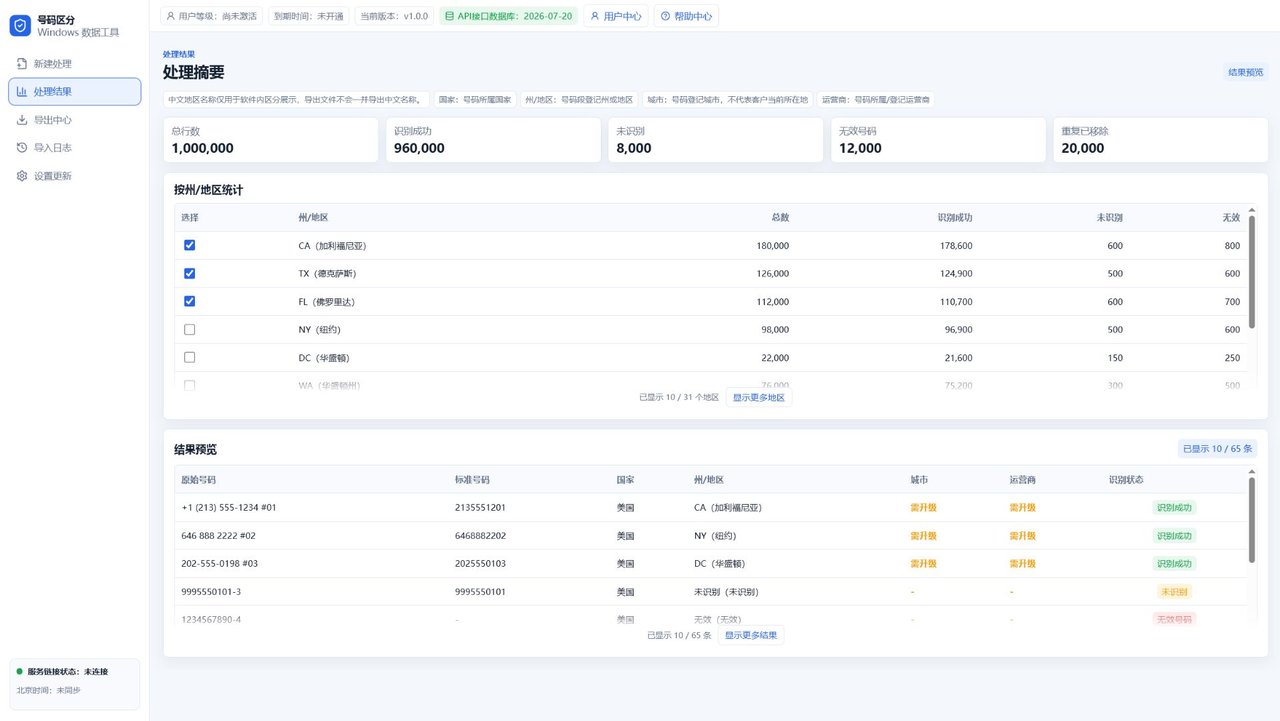
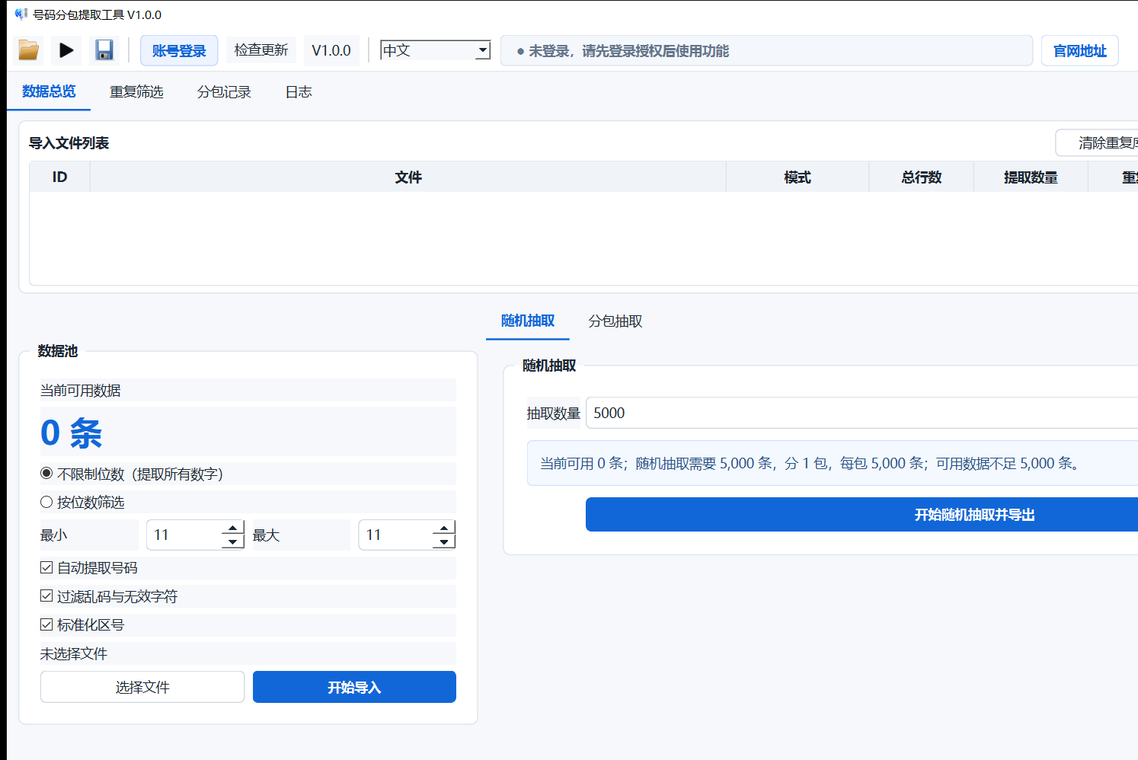
App A handles overseas number region filtering: US numbers can be grouped by state or region, with top-tier city and carrier fields. App B handles package extraction: import, dedupe, random extraction, split package export, and remaining-data export. One account signs in to both apps, with subscription level and expiry synced automatically.
Use cases
The Windows suite is useful for overseas sales teams, lead list cleanup, customer phone lists, SMS data preparation, and WhatsApp number files. Users can import large number files locally, then organize output by state, region, city, carrier, duplicate status, random extraction count, or package size.
For users searching for US phone number region lookup, state sorting, phone number state lookup, and export by state.
For trade, sales, and customer data teams that need to clean, classify, and export phone number lists.
For dedupe, random extraction, package splitting, count-based export, and remaining-data export workflows.
For TXT, CSV, and Excel phone number files that need batch import, filtering, statistics, and export.
For authorized IM, RCS, and SMS lists that need region filtering, dedupe, package export, and cleaner batch control.
For multi-channel or device-pool workflows where teams need region sorting, count-based packages, and traceable exports.
Apps
Users only need to understand one simple rule: sign in with the same account, and both apps sync subscription status.
Built for trade data cleanup. Import large US number files, view state or region statistics, and export TXT / CSV groups.
Designed for dedupe, random extraction, and delivery packages. Imported numbers enter a local pool and can be exported by count or package.
Shared access
Subscription status is not split into separate user systems. If a user activates Advanced in either app, both apps sync Advanced access. If the user upgrades to Top in App A, App B also shows the Top status.
Limited-time offer
The final payment amount is shown inside the Windows app. The website displays monthly, quarterly, and yearly references for quick comparison.
Advanced access in App A plus all features in App B. Subscribe in either app and the same account syncs both sides.
Monthly $9.90 / 30 daysUnlocks city, carrier, and fine-grained fields in App A. App B also displays the synced Top status.
Monthly $19.90 / 30 daysDisplayed inside App B as the Advanced subscription. The account still syncs to App A Advanced access.
Monthly $9.90 / 30 daysScreenshots
FAQ
Yes. The same account can log in to both apps and sync level plus expiry time.
Yes. App A can identify US phone number state or region ownership. Top-tier access can further unlock city and carrier filtering plus export.
Yes. You can import customer phone lists, US phone lists, and sales lead data, then organize the numbers by region, export selected groups, and reduce manual sorting work.
App B supports number import, dedupe, duplicate comparison, random extraction, package splitting, remaining-data export, and prefix export.
The workflow is designed for bulk TXT, CSV, and Excel number files. Actual speed depends on PC hardware, disk speed, and file format.
No. App B Advanced unlocks all features inside App B. If the user has Top from App A, App B will also show Top status.
No. The website is for product information and official downloads only. Login, subscription, and payment happen inside the Windows app.
Yes. Create an account to get a free trial and test import, filtering, extraction, and export before subscribing.
Official download
The latest portable Windows builds are ready. Choose App A or App B to download. If a lightweight Windows system lacks WebView2, the app will guide users to Microsoft's official runtime.
App A is the Number Region Filter. App B is the Package Extraction Tool. Both are portable Windows builds, and the website keeps real package paths hidden.