How to understand the city field
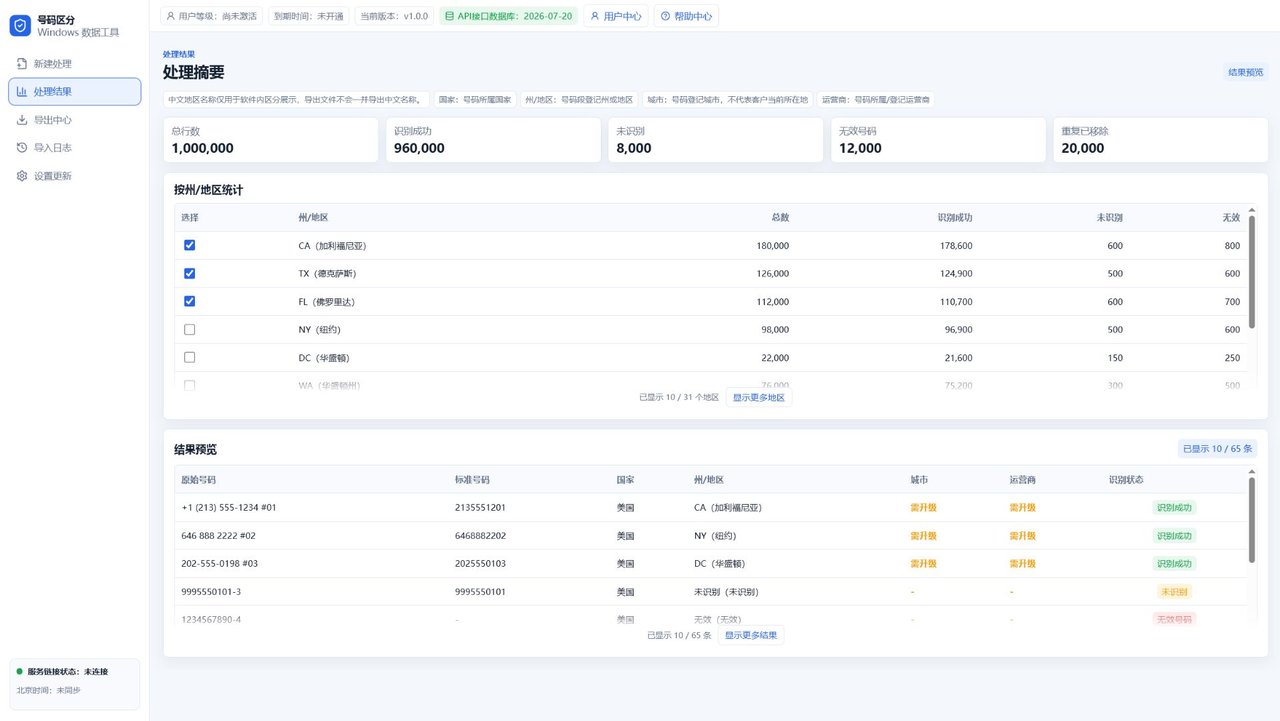
The interface uses the plain word city for the rate-center style field, making it easier for nontechnical users. It reflects assignment information, not the user's live physical location.
Users can filter selected cities for export or use the field only for preview and analysis.
How carrier filtering should work
Carrier filtering is useful when data needs to be grouped by the number resource carrier. Exports should group by carrier overall, not by carrier plus state, because that creates too many files.
If one carrier appears across multiple states, the carrier export should stay as one carrier group.
Top-tier export rules
Top-tier users can export city and carrier fields. Advanced users should not see city, carrier, NPA-NXX, or other top-tier fields in exported files.
The export center should clearly separate export by state, export by city, and export by carrier. TXT remains the preferred format for clean phone lists.
Avoid field overload
Previewing the first 10 to 20 rows is enough for most users to verify recognition quality. More rows or groups can be loaded only when the user asks.
Too many fields make exports harder to understand. Display labels can explain the fields, but output should follow the user's selected format and subscription permission.
When top-tier access is worth it
If state grouping is enough, Advanced usually covers the workflow. If teams need city assignment, carrier testing, or more precise segmentation, Top is the better plan.
Users can test the basic import and region flow first, then upgrade only when detailed fields are needed.
FAQ
Does city mean the user's current city?
No. It is assignment-based information, not live location.
Should carrier exports be split by state too?
No. Carrier exports should stay grouped by carrier to keep files clean.
Can Advanced users export city and carrier?
No. City and carrier export belong to top-tier access.