What data is suitable
This workflow fits overseas sales leads, US phone lists, SMS data, WhatsApp number files, and CRM exports. TXT, CSV, and spreadsheet-style files can be used as long as the phone number columns are readable.
The result is based on number assignment data, not the user's live location. A DC result means the number can be grouped under DC assignment information, not that the person is physically in Washington, DC.
Step 1: Import the number file
Open App A, choose United States, and select the number file. For large lists, remove empty lines, obvious headers, and corrupted characters before import.
If a file contains multiple columns, use automatic scanning or select the number column manually. The app shows import and cleaning progress so the user knows how much data is being processed.
Step 2: Run recognition and review state statistics
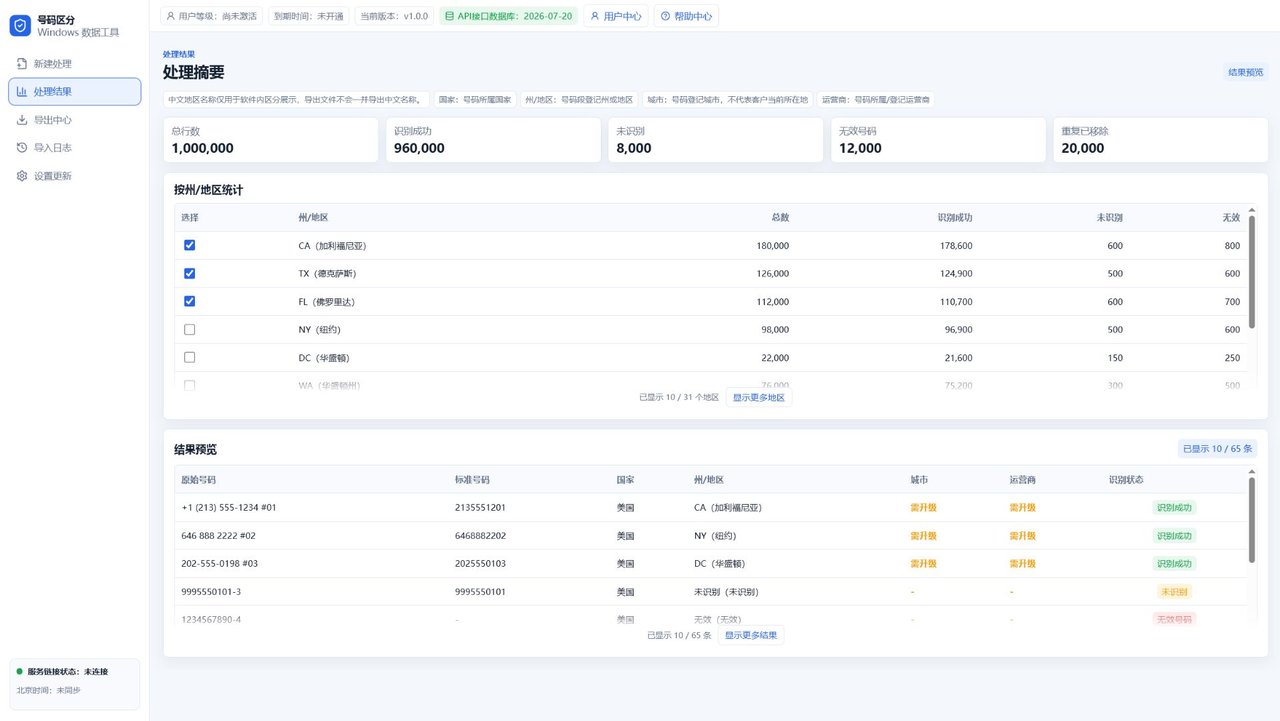
Before recognition starts, the app verifies the account status with the server. After authorization passes, local matching and cleaning produce grouped counts by state or region.
Results use compact labels such as DC, CA, TX, and NY. Extra language descriptions are for display only and do not force Chinese text into exported raw lists.
Step 3: Export by selected state
Select the states or regions you need and export TXT or CSV files. TXT is best for plain phone lists; CSV is better for spreadsheet or CRM follow-up.
Exports are grouped and sorted by state so selected regions do not appear randomly mixed in the output.
Common limitations
Region filtering does not guarantee the user's real address or whether the number is currently active. It solves the data organization step: group the numbers first, then decide how to use them.
City and carrier fields require top-tier access because those fields are more detailed and have separate export permissions.
FAQ
Can every US number be recognized by state?
Most US numbers can be grouped by assignment data, but ported numbers, VoIP numbers, and changing data sources may affect precision.
Will exports include Chinese state names?
No. Language descriptions are mainly for display. Exports focus on clean number and region fields.
How many numbers can a trial account export?
Trial export limits are controlled by backend rules. The app shows the current maximum when a limit is reached.